Spinning Up RL
Getting started with reinforcement learning
Reinforcement Learning From Scratch
A series on building reinforcement learning agents from scratch, covering everything from basic concepts to advanced techniques.
Stay Updated
Get notified about future updates to this series and other articles
Spinning Up RL
I've been working through Will Brown and Kyle Corbitt's Production Ready Agent Engineering Course and I'm really enjoying it so far. I was inspired by one of the notebooks that had a simple walkthrough on the basic RL loop and thought I'd tinker a bit with it to see how each parameter affects the final policy.
Reinforcement learning is simple - by teaching a model what's good and bad, it figures out how to make better decisions through trial and error. This is done by giving points for good actions and penalties for bad ones.
In this article, we'll explore this by building a simple reinforcement learning environment from scratch - a simple number guesser. This will help us to understand the core RL loop and the different ways that we can design rewards to guide learning.
I've uploaded the code here for you to play around with.
Basic Terms
The process works like this: the model takes actions in an environment until it reaches the end of a game. At the end, it receives a reward that tells it how well it performed. We then look back at each choice made during this run—called a rollout—and update the policy to make better decisions next time.
Here are the key concepts we'll be working with:
- Environment: The world the agent interacts with. In our case, it's a system that holds a secret target number and provides feedback based on guesses.
- State: A snapshot of the environment. For our number guesser, there's effectively just one state since the agent always starts from the same position.
- Action: A choice the agent can make. Here, it's guessing a specific number, like 42.
- Reward Function: The scoring system that tells the agent how good its action was. It takes a guess and returns a value we use to update the policy.
- Policy: The agent's strategy for choosing actions. In our case, it's the weights of the model that causes the agent to decide which number to guess next.
How we decide on the reward and how we update the policy is the core of reinforcement learning. Let's explore these concepts in greater detail
Number Guesser
In this example, we'll code up a simple environment where the agent will learn to guess a secret number. It'll start with a random guess then update its strategy based on the feedback it recieves.
touch guesser.pyuv add matplotlib numpy
At the heart of our agent is a policy - a probability distribution over all possible actions (numbers it can guess). We'll initialise this as a uniform distribution at the start where every single number has an equal probability of being guessed.
Creating our Agent
We'll then sample guesses from the policy at each round and then update it based on the feedback reward.
import numpy as np

class Guesser:
    def __init__(self, min: int, max: int):
        # Start with a uniform distribution - every number is equally likely
        self.policy = np.ones(max - min + 1) / (max - min + 1)
        self.min = min
        self.max = max

    def guess(self, size: int = 1) -> list[int]:
        """Makes guesses based on the current policy."""
        return np.random.choice(
            list(range(self.min, self.max + 1)), size=size, p=self.policy
        )
The guess method samples from the policy distribution. Numbers with higher probabilities are more likely to be chosen.
Initially, since all probabilities are equal, the agent will guess randomly.
Computing our Rewards
Looking at the Guesser class above, we generate a list of guesses based on the policy. Since we want to experiment with a few different reward functions, we'll define a base class Rubric that all reward functions will inherit from.
from abc import ABC, abstractmethod

class Rubric(ABC):
    """Base class for reward rubrics."""

    @abstractmethod
    def evaluate_batch(self, guesses: list[int]) -> list[float]:
        """Evaluates a batch of guesses and returns a reward vector."""
        pass
We'll then use a BinaryRubric class here to evaluate our guesses and compute a reward.
Since we want to update the policy directly, our final output from this BinaryRubric class will be a reward vector that has the same length as the list of guesses.
class BinaryRubric(Rubric):
    """A rubric that provides reward vectors for entire batches of guesses."""

    def __init__(self, target: int, min: int, max: int):
        self.target = target
        self.min = min
        self.max = max

    def evaluate_batch(self, guesses: list[int]) -> list[float]:
        """
        Evaluates a batch of guesses and returns a reward vector.
        The reward vector has the same dimension as the action space.
        """
        action_space_size = self.max - self.min + 1
        reward_vector = [0.0] * action_space_size

        for guess in guesses:
            reward = 1.0 if guess == self.target else 0.0
            action_idx = guess - self.min
            reward_vector[action_idx] += reward

        return [r / len(guesses) for r in reward_vector]
If the agent guessed the correct number during the batch, that position gets a point. This approach gives us a cumulative picture of which actions were successful across many attempts.
Updating our Policy
The final step is to teach our agent to learn from the rewards. To do so, we'll add an update_policy method to our Guesser class.
def update_policy(self, reward_vector: list[float]):
    """Updates the policy based on a full reward vector."""
    rewards = np.array(reward_vector)
    self.policy = self.policy + rewards
    self.policy = np.maximum(self.policy, 1e-8)
    self.policy = self.policy / self.policy.sum()
By adding the reward vector to our existing policy, actions that received rewards get their probabilities increased while others stay the same. We then renormalise to make sure our probabilities sum to 1.
Let's now see it in action
if __name__ == "__main__":
    MIN = 0
    MAX = 10
    TARGET = 6
    BATCH_SIZE = 10
    ITERATIONS = 20

    agent = Guesser(MIN, MAX)
    rubric = BinaryRubric(target=TARGET, min=MIN, max=MAX)

    target_idx = TARGET - MIN
    print(f"Target number: {TARGET}, Probability: {agent.policy[target_idx]:.4f}\n")

    for i in range(ITERATIONS):
        guesses = agent.guess(BATCH_SIZE)
        reward_vector = rubric.evaluate_batch(guesses)
        agent.update_policy(reward_vector)

        print(f"Iteration {i + 1}: P(guess={TARGET}) = {agent.policy[target_idx]:.3f}")
We can see how fast our policy converges on the target number 6.
(spinning-up-rl) ivanleo@Mac ~/D/c/spinning-up-rl (main)> python3 ./guesser.pyTarget number: 6, Probability: 0.0909Iteration 1: P(guess=6) = 0.242Iteration 3: P(guess=6) = 0.508Iteration 5: P(guess=6) = 0.777Iteration 7: P(guess=6) = 0.935Iteration 9: P(guess=6) = 0.983Iteration 11: P(guess=6) = 0.996Iteration 13: P(guess=6) = 0.999Iteration 15: P(guess=6) = 1.000(spinning-up-rl) ivanleo@Mac ~/D/c/spinning-up-rl (main)> )
When you run this, you'll see the policy transform from a uniform distribution (all numbers equally likely) to one that heavily favors the target number.
Experiments
We can see here that there are a few different things that we can vary in our experiment. Let's explore them one by one and see how they work. It's pretty easy to do so since we can just change the parameters and run the script again.
To do so, we'll create a new file called ablations.py which will contain the code for the experiments that we're going to run
touch init ablations.py
We can then define a helper method called run_experiment in the ablations.py file which allows us to parameterize the experiment and log the probabilities of our target number across different iterations.
def run_experiment(
    min_val: int,
    max_val: int,
    target: int,
    batch_size: int,
    iterations: int,
    rubric_class: Type[Rubric] = BinaryRubric,
) -> list[float]:
    """Run a single experiment and return probability trajectory."""
    agent = Guesser(min_val, max_val)
    rubric = rubric_class(target=target, min=min_val, max=max_val)
    target_idx = target - min_val

    probs = [agent.policy[target_idx]]

    for _ in range(iterations):
        guesses = agent.guess(batch_size)
        reward_vector = rubric.evaluate_batch(guesses)
        agent.update_policy(reward_vector)
        probs.append(agent.policy[target_idx])

    return probs
We'll also define a simple generic ExperimentResult type that represents the result of a single experiment. So for instance, if we varied the batch size, each run of our experiment would return a list of probabilities for each iteration. We would then store the probability of our target index at each iteration for easy visualisation betweeen different runs and a label that we can associate this specific run with.
class ExperimentResult(TypedDict):
    label: str
    probs: list[float]
Action Space
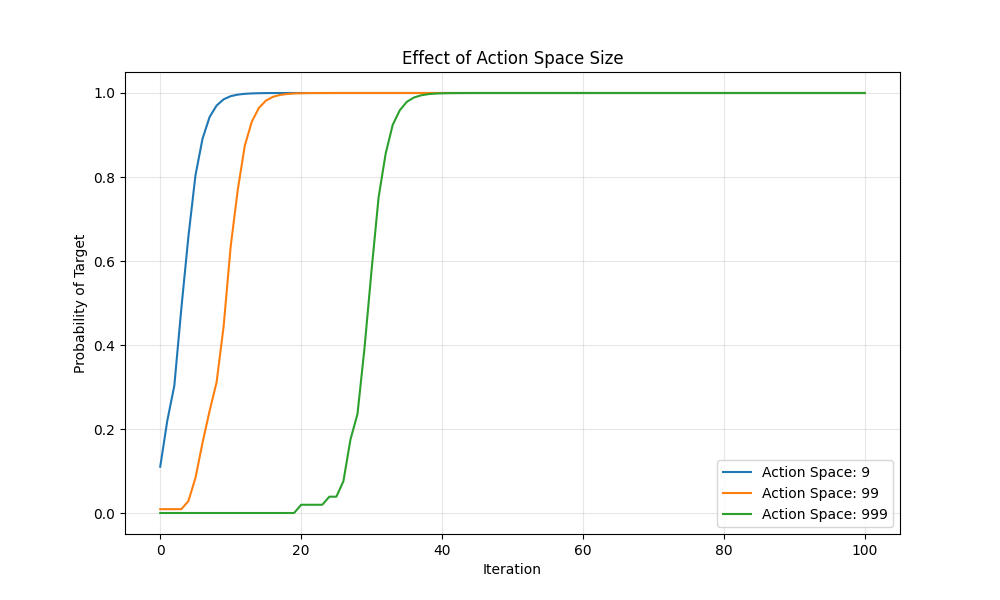
A larger action space means there are more possible guesses, which should make it harder for the agent to find the correct one by random chance. Let's do so by running it across a few different possible numbers that we need to guess from.
We'll define a simple run_action_space_ablation helper function here to make it easier to run multiple experiments.
def run_action_space_ablation(
    target: int,
    batch_size: int,
    iterations: int,
    action_spaces: list[int],
    rubric_class: Type[Rubric] = BinaryRubric,
) -> list[ExperimentResult]:
    results = []
    for action_space_size in action_spaces:
        min_val = 0
        max_val = action_space_size - 1
        probs = run_experiment(min_val, max_val, target, batch_size, iterations, rubric_class)
        results.append({
            "label": f"Action Space: {action_space_size}",
            "probs": probs
        })
    return results
Let's now run these across a few different action spaces and see how the agent performs. Let's also define a simple helper to plot these results that we can reuse across our subsequent experiments.
def plot_ablation(results: list[ExperimentResult], title: str, filepath: str):
    plt.figure(figsize=(10, 6))
    for result in results:
        plt.plot(result["probs"], label=result["label"])
    plt.xlabel("Iteration")
    plt.ylabel("Probability of Target")
    plt.title(title)
    plt.legend()
    plt.grid(True, alpha=0.3)
    plt.savefig(filepath)
    plt.close()

if __name__ == "__main__":
    TARGET = 5
    BATCH_SIZE = 50
    ITERATIONS = 100
    ACTION_SPACES = [9, 99, 999]
    results = run_action_space_ablation(TARGET, BATCH_SIZE, ITERATIONS, ACTION_SPACES)
    plot_ablation(results, "Effect of Action Space Size", "action_space_rl.png")
This yields the following graph where we can see that the smaller the action space, the quicker our policy shifts towards the correct answer - that is the possibility of 1 for the target index since it'll always be correct.
Batch Size
What happens then if we increase the batch size? We can simply define another helper function to handle this.
def run_batch_size_ablation(
    min_val: int,
    max_val: int,
    target: int,
    iterations: int,
    batch_sizes: list[int],
    rubric_class: Type[Rubric] = BinaryRubric,
) -> list[ExperimentResult]:
    results = []
    for batch_size in batch_sizes:
        probs = run_experiment(min_val, max_val, target, batch_size, iterations, rubric_class)
        results.append({
            "label": f"Batch Size: {batch_size}",
            "probs": probs
        })
    return results
We can observe that with a large batch size, we get a quicker convergence to a probability of 1 for the target index.
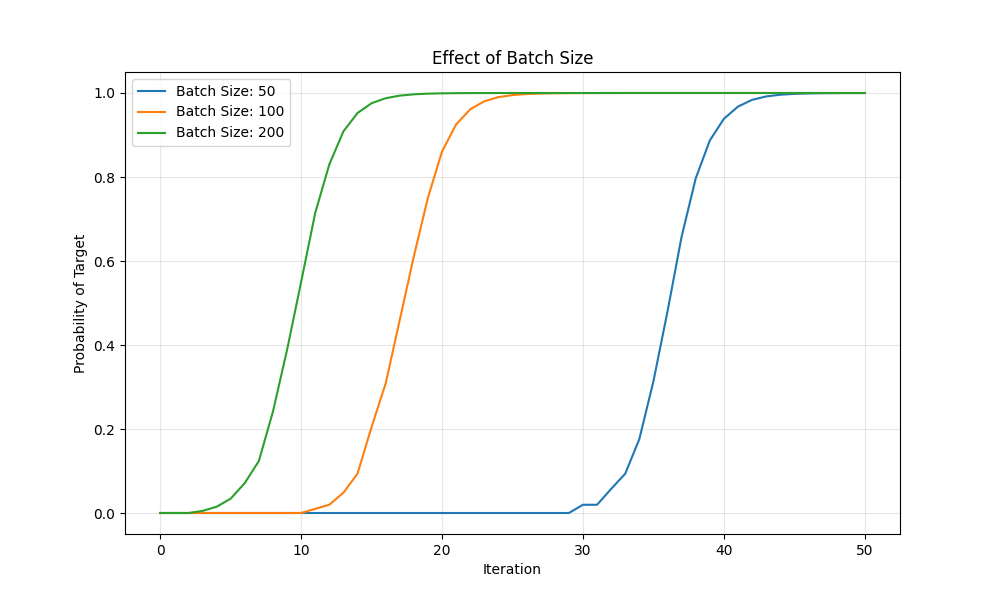
Intuitively this is because with a larger batch size, for a single binary reward, having a larger batch size means that the agent has more attempts to get the correct answer, and consequently the jackpot binary reward.
Reward Function
We can also experiment with the reward function.
Currently, we can see that the reward function is a simple binary reward, where the agent gets a reward of 1 if it guesses the correct number and 0 otherwise. But we can also use shaped rewards, that provide a continous reward signal. This means that instead of just a single binary 1 or 0, the agent gets a reward that's proportional to the distance to the target. We'll experiment here with two different rewards
- Exponential Rubric: This provides an exponential decay reward based on the distance to the target
- Linear Rubric : This provides a simple linear reward
Let's see how we can implement them below
class ExponentialRubric(Rubric):
    """A rubric that provides exponential decay rewards based on distance to target."""

    def __init__(self, target: int, min: int, max: int, decay_factor: float = 5.0):
        self.target = target
        self.min = min
        self.max = max
        self.decay_factor = decay_factor

    def evaluate_batch(self, guesses: list[int]) -> list[float]:
        """Evaluates guesses with exponential decay based on distance."""
        action_space_size = self.max - self.min + 1
        reward_vector = [0.0] * action_space_size

        for guess in guesses:
            distance = abs(guess - self.target)
            action_idx = guess - self.min
            reward = np.exp(-distance / self.decay_factor)
            reward_vector[action_idx] += reward

        return [r / len(guesses) for r in reward_vector]

class LinearRubric(Rubric):
    """A rubric that provides linear rewards based on distance to target."""

    def __init__(self, target: int, min: int, max: int):
        self.target = target
        self.min = min
        self.max = max
        self.max_distance = max - min

    def evaluate_batch(self, guesses: list[int]) -> list[float]:
        """Evaluates guesses with linear decay based on distance."""
        action_space_size = self.max - self.min + 1
        reward_vector = [0.0] * action_space_size

        for guess in guesses:
            distance = abs(guess - self.target)
            action_idx = guess - self.min
            reward = 1.0 - (distance / self.max_distance)
            reward_vector[action_idx] += reward

        return [r / len(guesses) for r in reward_vector]
Running our new ablations means we just need to define a new helper function in our ablations.py file
def run_reward_function_ablation(
    min_val: int,
    max_val: int,
    target: int,
    batch_size: int,
    iterations: int,
    rubrics: list[tuple[Type[Rubric], str]],
) -> list[ExperimentResult]:
    results = []
    for rubric_class, label in rubrics:
        probs = run_experiment(min_val, max_val, target, batch_size, iterations, rubric_class)
        results.append({"label": label, "probs": probs})
    return results
And then we can run and plot it by updating our if __name__ == "main" logic
if __name__ == "__main__":
    TARGET = 5
    BATCH_SIZE = 50
    ITERATIONS = 50
    ACTION_SPACES = [9, 99, 999]
    results = run_action_space_ablation(TARGET, BATCH_SIZE, ITERATIONS, ACTION_SPACES)
    plot_ablation(results, "Effect of Action Space Size", "action_space_rl.png")

    BATCH_SIZES = [50, 100, 200]
    results = run_batch_size_ablation(0, 1000, TARGET, ITERATIONS, BATCH_SIZES)
    plot_ablation(results, "Effect of Batch Size", "batch_size_rl.png")

    rubrics = [
        (BinaryRubric, "Binary Reward"),
        (ExponentialRubric, "Exponential Reward"),
        (LinearRubric, "Linear Reward"),
    ]
    results = run_reward_function_ablation(
        0, 100, target=50, batch_size=50, iterations=100, rubrics=rubrics
    )
    plot_ablation(results, "Effect of Reward Function", "reward_function_rl.png")
This in turn produces the following graph where we can see that the binary reward works the best for our simple task, followed by the exponential reward function and lastly the linear reward function
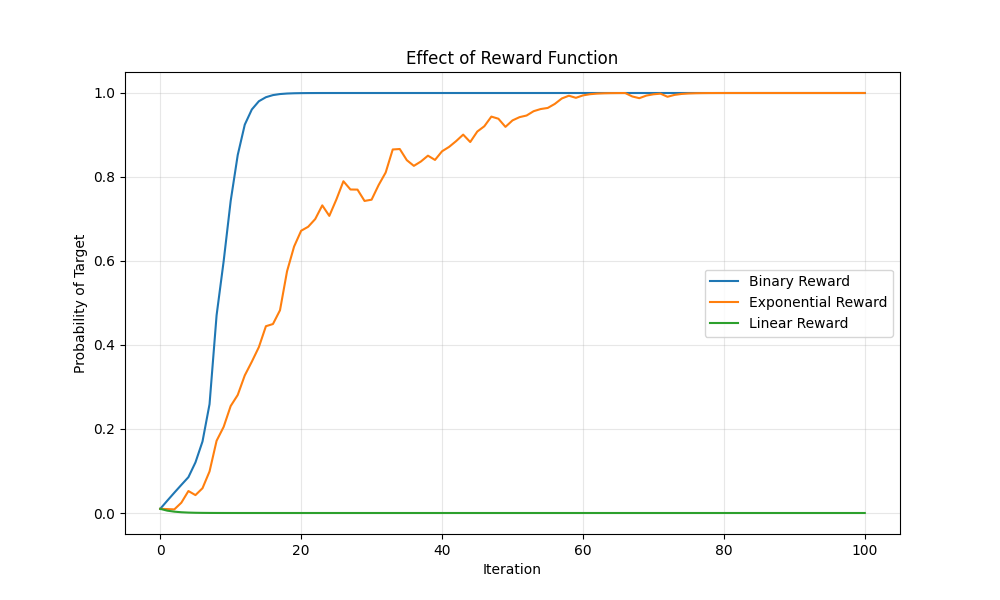
This is largely due to the shape of the reward function ( and how it differs with distance from the target ). The exponential decay reward function provides a much steeper reward signal for guesses that are closer to the target while the linear reward function provides a more gradual reward signal.
The binary reward however, provides a single reward signal while providing none to the others. We can see this wth the following plot
import numpy as np
import matplotlib.pyplot as plt

# Parameters matching our rubrics
min_val = 0
max_val = 100
max_distance = max_val - min_val
decay_factor = 5.0

# Distance range
distances = np.arange(0, max_distance + 1)

# Binary reward (1 at distance 0, 0 everywhere else)
binary_rewards = np.where(distances == 0, 1.0, 0.0)

# Linear reward (matches LinearRubric)
linear_rewards = 1 - distances / max_distance

# Exponential reward (matches ExponentialRubric)
exp_rewards = np.exp(-distances / decay_factor)

# Plot
plt.figure(figsize=(10, 6))
plt.plot(distances, binary_rewards, label='Binary: 1 if distance=0, else 0', linewidth=2.5, linestyle='--')
plt.plot(distances, linear_rewards, label=f'Linear: 1 - distance/{max_distance}', linewidth=2)
plt.plot(distances, exp_rewards, label=f'Exponential: exp(-distance/{decay_factor})', linewidth=2)

plt.xlabel('Distance from Target')
plt.ylabel('Reward')
plt.title('Reward Gradients: Binary vs Linear vs Exponential')
plt.legend()
plt.grid(True, alpha=0.3)
plt.xlim(0, max_distance)
plt.ylim(-0.05, 1.1)

plt.savefig('reward_gradient.png', dpi=300, bbox_inches='tight')
print("Saved reward_gradient.png")
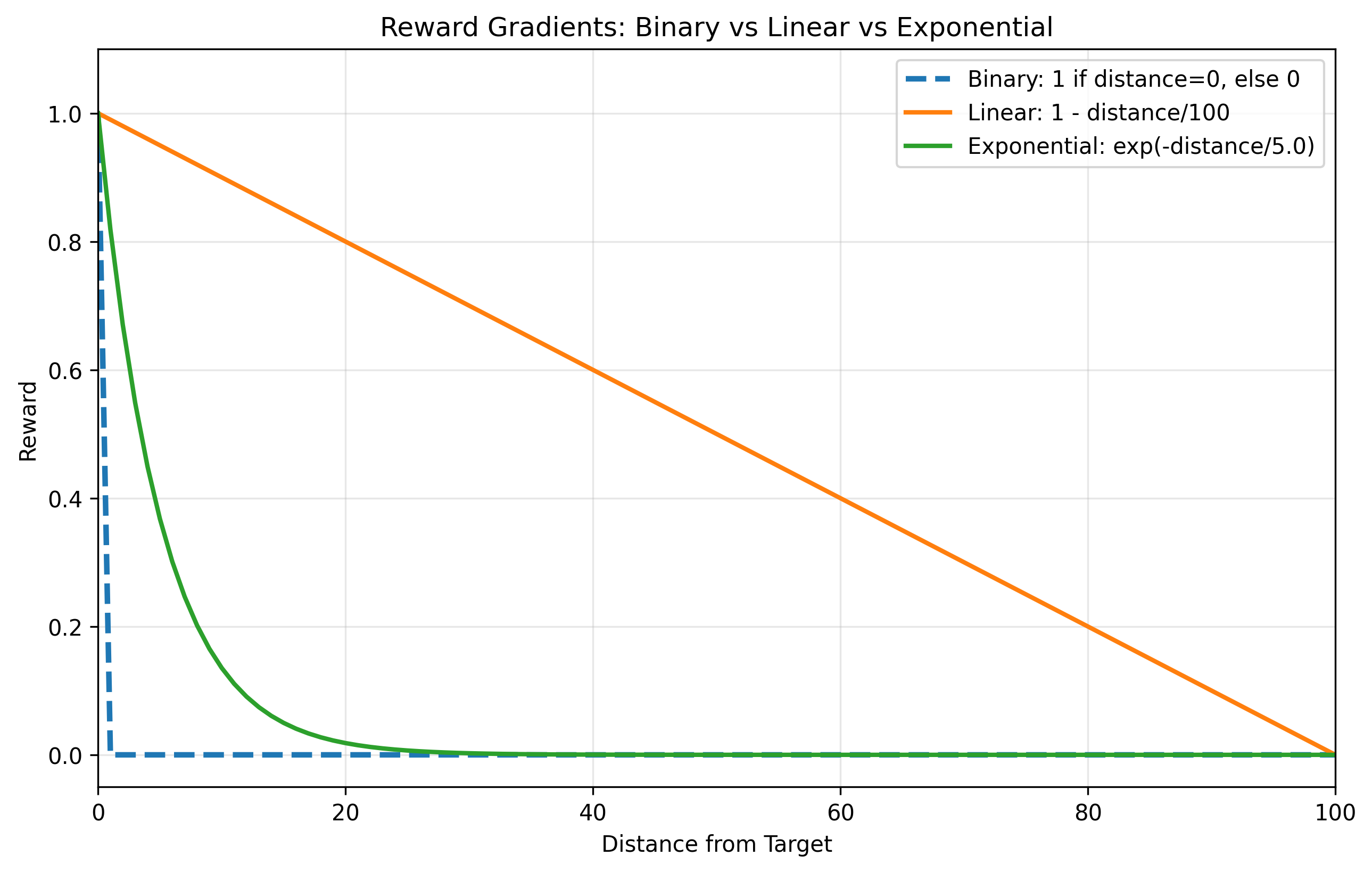
The dramatic difference in performance is explained by the shape of this reward signal. The binary reward provides the clearest possible feedback: a single, unambiguous jackpot for the correct answer and nothing for any other. This allows the policy to rapidly strengthen the probability of the correct action.
The exponential reward function succeeds for a similar reason; it creates a steep, focused gradient that provides a strong reward signal for guesses very close to the target while quickly falling off to near-zero for all other guesses. This "sharpness" effectively guides the agent's policy toward the correct region of the action space, resulting in fast convergence.
In stark contrast, the linear reward function fails because its signal is too diluted. By assigning a small, non-zero reward to every single action, it creates a poor signal-to-noise ratio. When the rewards are averaged and added back to the policy, the update is spread thinly across all possible actions, and the reward for the correct action isn't distinct enough to stand out from this background noise
Conclusion
Our number-guessing agent operated in a simple world with only one state. Binary rewards are simple and effective in this case because they drastically overfit to the single target number quickly, but this is a liability in more complex and long horizon tasks. Remember, this is because in this task, there is only one correct answer - the target number, making binary rewards exceptionally well suited for this task
what happens, for instance, when an agent must choose between multiple actions, each with its own unknown probability of success? This is the classic multi-armed bandit problem, where you have to decide which slot machine (or "bandit") to play to maximize your winnings over time. It introduces a critical trade-off: should you exploit the action that has given the best rewards so far, or should you explore other actions that might be even better?
In the next article in this series, we'll apply the core principles we learned here—defining actions, designing rewards, and updating a policy—to build an agent that can intelligently solve the multi-armed bandit problem.