ET Phone Home
Deploying our agent on Telegram with ngrok so it can report back
Openclawd From Scratch
Build Your Own OpenClaw From Scratch is a hands-on series where we rebuild an OpenClaw-style agent from first principles. Starting from a blank file, we'll implement the core agent loop, tool use, sandboxed execution on Modal. By the end, you'll have an agent that can install what it needs, run real workflows, and evolve over time.
Stay Updated
Get notified about future updates to this series and other articles
Our agent can read, write and even extend itself - but right now it's stuck in a terminal. In this post, we'll fix that by allowing you to message it from your phone and watch it work in real time.
The setup is dead simple: a local Python server, ngrok to expose it to the internet, and Telegram's Bot API to send and receive messages. No database, no deployment pipeline, no infrastructure to manage.
We'll refactor our Agent class so that we have a few hooks so that firing off a Telegram notification on every tool call is just a few lines of code.
Let's get into it.
Creating an Agent Class
Before we add any hooks, let's clean up our code. In the last post, the runtime logic — loading tools, reloading on file changes, executing tool calls — was scattered across our main loop. That makes it hard to extend. So the first step is to pull all of that into a single Agent class.
The idea is simple: the Agent owns the LLM client, the tool registry, and the hot-reload logic. It exposes a single run() method that takes a conversation, calls the model, executes any tool calls, and returns the tool responses (or None when the model is done). Everything else — the REPL loop, how we display output — stays outside.
import asyncio
import importlib
from pathlib import Path
from typing import Any

import agent_tools
from agent_tools import AgentContext, AgentTool, ToolResult
from google.genai import Client, types


class Agent:
    def __init__(self, model: str = "gemini-3-flash-preview"):
        self.model = model
        self.client = Client()
        self.context = AgentContext()

        self.tools_module = agent_tools
        self.tools_file = Path(self.tools_module.__file__).resolve()
        self.last_modified = self._mtime(self.tools_file)
        self.tools = self._load_tools(self.tools_module)

    @staticmethod
    def _mtime(path: str | Path) -> float:
        return Path(path).stat().st_mtime

    @staticmethod
    def _load_tools(module: Any) -> dict[str, type[AgentTool]]:
        return {tool.__name__: tool for tool in module.TOOLS}

    def maybe_reload_runtime(self) -> bool:
        current = self._mtime(self.tools_file)
        if current == self.last_modified:
            return False

        try:
            self.tools_module = importlib.reload(self.tools_module)
            self.tools_file = Path(self.tools_module.__file__).resolve()
            self.tools = self._load_tools(self.tools_module)
            self.last_modified = self._mtime(self.tools_file)
            loaded_tools = ", ".join(sorted(self.tools.keys())) or "(none)"
            print(
                f"[Tool Reload] Loaded tools from {self.tools_file.name}: {loaded_tools}"
            )
            return True
        except Exception as exc:
            print(f"[Tool Reload] Failed, keeping previous runtime: {exc}")
            return False

    def get_tools(self) -> list[types.Tool]:
        self.maybe_reload_runtime()
        return [tool_cls.to_genai_schema() for tool_cls in self.tools.values()]

    async def execute_tool(self, tool_name: str, args: dict[str, Any]) -> ToolResult:
        tool_cls = self.tools.get(tool_name)
        if tool_cls is None:
            return ToolResult(
                error=True,
                name=tool_name,
                response={"error": f"Unknown tool: {tool_name}"},
            )

        try:
            tool_input = tool_cls.model_validate(args or {})
            return await tool_input.execute(self.context)
        except Exception as exc:
            return ToolResult(
                error=True,
                name=tool_name,
                response={"error": str(exc)},
            )

    async def run(self, conversation: list[types.Content]) -> types.Content | None:
        """Run one assistant step. Returns tool-response message, or None when done."""
        completion = await self.client.aio.models.generate_content(
            model=self.model,
            contents=conversation,
            config=types.GenerateContentConfig(tools=self.get_tools()),
        )

        message = completion.candidates[0].content
        conversation.append(message)

        function_calls = [
            part.function_call for part in message.parts if part.function_call
        ]

        if not function_calls:
            text_parts = [part.text for part in message.parts if part.text]
            if text_parts:
                print(f"\nAssistant: {''.join(text_parts)}")
            return None

        tool_responses: list[types.Part] = []
        for call in function_calls:
            call_args = call.args or {}
            print(f"[Agent Action] Running '{call.name}' with args: {call_args}")
            result = await self.execute_tool(call.name, call_args)
            print(f"[Agent Action] Result: {result.response}")
            tool_responses.append(result.to_genai_message())

        return types.UserContent(parts=tool_responses)
The run() method is the core loop we've had from the start — call the model, check for tool calls, execute them, return the results. The difference is it's now a method on a class that manages its own state. Hot-reloading, tool registration, the LLM client — it's all encapsulated in one place.
Our main loop becomes dead simple:
async def main() -> None:
    print("Type 'exit' or 'quit' to stop.")
    conversation: list[types.Content] = []
    agent = Agent()

    while True:
        user_input = input("\nYou: ").strip()
        if user_input.lower() in {"exit", "quit"}:
            break
        if not user_input:
            continue

        conversation.append(
            types.UserContent(parts=[types.Part.from_text(text=user_input)])
        )

        while True:
            next_message = await agent.run(conversation)
            if next_message is None:
                break
            conversation.append(next_message)


if __name__ == "__main__":
    asyncio.run(main())
This is cleaner, but there's a problem. The print() calls for tool results and assistant text are hardcoded inside run(). If we want to send those to Telegram instead of the terminal, we'd have to go back in and edit the Agent class. That's exactly what hooks will fix.
Adding Hooks
Right now if we want to know what the agent is doing, we have to stare at the terminal. That's fine for debugging but useless when you're away from your desk.
What we really want is a way to say "every time a tool is called, do this" without hardcoding that logic into run.
That's what hooks give us — simple callbacks registered against events in the agent's lifecycle. The agent provides the raw data and we do whatever we want with it — print to stdout, send a Telegram message, log to a file, whatever.
This keeps the Agent class focused on orchestration while all the side-effect logic (notifications, logging, UI updates) lives outside it, easy to swap or combine.
We'll define three hooks:
on_model_response: Fires when we get a response back from the LLMon_tool_call: Fires right before we execute a toolon_tool_result: Fires after a tool finishes executing
Each hook has a different signature — on_model_response receives the model's message, on_tool_call receives the function call, and on_tool_result receives the result along with the tool name and args. We use Protocol classes to type each one so we get proper autocomplete and type checking:
HookType: TypeAlias = Literal[
    "on_model_response",
    "on_tool_call",
    "on_tool_result",
]


class ModelResponseHook(Protocol):
    def __call__(
        self, *, message: types.Content, context: AgentContext
    ) -> Awaitable[None]: ...


class ToolCallHook(Protocol):
    def __call__(
        self, *, call: types.FunctionCall, context: AgentContext
    ) -> Awaitable[None]: ...


class ToolResultHook(Protocol):
    def __call__(
        self,
        *,
        result: ToolResult,
        call_name: str,
        call_args: dict[str, Any],
        context: AgentContext,
    ) -> Awaitable[None]: ...


AnyHook: TypeAlias = ModelResponseHook | ToolCallHook | ToolResultHook
Notice every hook is keyword-only (*) and async. Keyword-only args mean you can't accidentally pass arguments in the wrong order, and making them async means hooks can do I/O (like sending a Telegram message) without blocking.
Now we add the registration and emission methods to our Agent class. The on() method uses @overload so the type checker knows which hook type goes with which event name. The emit() method passes all its kwargs straight through to the handlers:
class Agent:
    def __init__(self, model: str = "gemini-3-flash-preview"):
        # ... existing init code ...
        self._hooks: dict[HookType, list[AnyHook]] = {
            "on_model_response": [],
            "on_tool_call": [],
            "on_tool_result": [],
        }

    @overload
    def on(
        self, event: Literal["on_model_response"], handler: ModelResponseHook
    ) -> "Agent": ...

    @overload
    def on(self, event: Literal["on_tool_call"], handler: ToolCallHook) -> "Agent": ...

    @overload
    def on(
        self, event: Literal["on_tool_result"], handler: ToolResultHook
    ) -> "Agent": ...

    def on(self, event: HookType, handler: AnyHook) -> "Agent":
        self._hooks[event].append(handler)
        return self

    async def emit(self, event: HookType, **kwargs: Any) -> None:
        for handler in self._hooks[event]:
            try:
                await handler(**kwargs)
            except Exception as exc:
                print(f"[Hook Error] Event '{event}' failed: {exc}")
The on() method returns self so you can chain registrations if you want. The emit() method wraps each handler in a try/except — a broken hook shouldn't crash the agent.
Now we wire the hooks into run(). Instead of hardcoded print() calls, we just emit events at the right moments:
async def run(self, conversation: list[types.Content]) -> types.Content | None:
    """Run one assistant step. Returns tool-response message, or None when done."""
    completion = await self.client.aio.models.generate_content(
        model=self.model,
        contents=conversation,
        config=types.GenerateContentConfig(tools=self.get_tools()),
    )

    message = completion.candidates[0].content
    conversation.append(message)
    await self.emit("on_model_response", message=message, context=self.context)

    function_calls = [
        part.function_call for part in message.parts if part.function_call
    ]

    if not function_calls:
        return None

    tool_responses: list[types.Part] = []
    for call in function_calls:
        call_args = call.args or {}
        await self.emit("on_tool_call", call=call, context=self.context)
        result = await self.execute_tool(call.name, call_args)
        await self.emit(
            "on_tool_result",
            result=result,
            call_name=call.name,
            call_args=call_args,
            context=self.context,
        )
        tool_responses.append(result.to_genai_message())

    return types.UserContent(parts=tool_responses)
The Agent class no longer has any opinion on how output is displayed. It just fires events and moves on.
Now we can write simple handlers that replicate our old CLI output. We'll use rich for nicer formatting — a green checkmark for success, a red cross for errors:
from rich import print as rprint

async def print_llm_response(*, message: types.Content, context: AgentContext):
    for part in message.parts:
        if part.text:
            print(f"* {part.text}")


async def print_tool_result(
    *,
    result: ToolResult,
    call_name: str,
    call_args: dict[str, Any],
    context: AgentContext,
) -> None:
    status = "[green]✓[/green]" if not result.error else "[red]✗[/red]"
    rprint(f"{status} [bold]{call_name}[/bold] {call_args}")
And our main loop registers them on the agent before running:
async def main() -> None:
    print("Type 'exit' or 'quit' to stop.")
    conversation: list[types.Content] = []
    agent = Agent()
    agent.on("on_tool_result", print_tool_result)
    agent.on("on_model_response", print_llm_response)

    while True:
        user_input = input("\nYou: ").strip()
        if user_input.lower() in {"exit", "quit"}:
            break
        if not user_input:
            continue

        conversation.append(
            types.UserContent(parts=[types.Part.from_text(text=user_input)])
        )
        print("Assistant")

        while True:
            next_message = await agent.run(conversation)
            if next_message is None:
                break
            conversation.append(next_message)


if __name__ == "__main__":
    asyncio.run(main())
And with this we've migrated away from our messy hardcoded printing. Here's what it looks like now:
You: can u help me find out what files are in the 1. folder
Assistant
✓ Bash {'command': 'ls -R 1/'}
✓ Bash {'command': 'ls -F'}
✓ Bash {'command': 'ls -R "1 - It\'s Alive/"'}
* The `1` folder is actually named `1 - It's Alive/`. Here are the files it contains:

* `agent_tool_extend.py`
* `agent_tool_factory.py`
* `agent_tools.py`
* `agent_with_read_file_tool.py`
* `agent.py`
* `README.md`

Let me know if you'd like to see the contents of any of these files!
Same agent, same tools — but the output logic is completely decoupled. Want to log to a file instead? Write a different hook. Want both? Register both. The Agent class doesn't care.
Adding a server
Now in order for us to recieve messages from telegram, we need to have our agent be able to be called from an external process. To do so, we'll now add a server that we can use to send messages and trigger our agent locally.
Luckily this code is relatively mild since we can just reuse the previous Agent class that we defined. We can also reuse the same hooks that we previously built.
from fastapi import FastAPI
from pydantic import BaseModel
from google.genai import types

from agent_hooks import Agent
from agent_tools import AgentContext, ToolResult
from typing import Any
from rich import print as rprint

app = FastAPI()

# In-memory conversation store
conversation = []


class ChatRequest(BaseModel):
    message: str


async def print_llm_response(*, message: types.Content, context: AgentContext):
    for part in message.parts:
        if part.text:
            print(f"* {part.text}")


async def print_tool_result(
    *,
    result: ToolResult,
    call_name: str,
    call_args: dict[str, Any],
    context: AgentContext,
) -> None:
    status = "[green]✓[/green]" if not result.error else "[red]✗[/red]"
    rprint(f"{status} [bold]{call_name}[/bold] {call_args}")


agent = Agent()
agent.on("on_tool_result", print_tool_result)
agent.on("on_model_response", print_llm_response)


@app.post("/chat")
async def chat(req: ChatRequest):
    print(f"You: {req.message}")
    conversation.append(
        types.Content(role="user", parts=[types.Part(text=req.message)])
    )

    while True:
        next_message = await agent.run(conversation)
        if next_message is None:
            break
        conversation.append(next_message)

    return {"response": "ok"}


if __name__ == "__main__":
    import uvicorn

    uvicorn.run(app, host="0.0.0.0", port=8000)
Since our hooks are already defined on the Agent class, the server code is almost identical to the CLI version — we just register the same hooks and run the same loop inside a FastAPI endpoint instead of a while True REPL.
Here's a simple python snippet that I used to call this endpoint.
import requests

response = requests.post(
    "http://localhost:8000/chat",
    json={"message": "Can you also read the server.py file and explain what's there"},
)

print(f"Status: {response.status_code}")
print(f"Response: {response.json()}")
As long as our server does not restart our conversation is going to be kept working nice and dandy. Let's now see hook this up to telegram and get our bot working nicely with it.
Receiving Telegram Messages
We've got a server that accepts messages over HTTP. Now let's make it reachable from Telegram so we can text our agent from our phone.
Setting Up the Bot
First, create a bot on Telegram by messaging the BotFather. It's straightforward — follow the prompts and you'll get a bot token and a bot URL. Store the token in a .env file:
TELEGRAM_BOT_TOKEN=<token here>
Exposing Our Server with ngrok
Our server is running locally, but Telegram needs a public URL to send messages to. That's where ngrok comes in — it creates a tunnel from a public URL to your local machine.
ngrok http 8000
This will give you a forwarding URL like https://abc123.ngrok-free.app. Copy that — we'll need it to tell Telegram where to send messages.
Setting the Webhook
Telegram uses webhooks to deliver messages. Instead of us polling for new messages, Telegram pushes them to our server whenever someone sends a message to our bot. We just need to tell Telegram which URL to hit.
We can do this with a simple curl command. Replace <BOT_TOKEN> with your token and <NGROK_URL> with the forwarding URL from above:
curl "https://api.telegram.org/bot<BOT_TOKEN>/setWebhook?url=<NGROK_URL>/chat"
You should get back a response like {"ok":true,"result":true,"description":"Webhook was set"}. Now every message sent to your bot will be forwarded as a POST request to your /chat endpoint.
Handling Telegram Updates
When Telegram sends a message to our webhook, it doesn't use our ChatRequest format — it sends its own Update object with nested chat and message data. We need to parse that instead.
Rather than pulling in the full python-telegram-bot library just for deserialization, we can define a couple of simple Pydantic models that match the shape of what Telegram sends us:
class TelegramChat(BaseModel):
    id: int


class TelegramMessage(BaseModel):
    chat: TelegramChat
    text: str = ""


class TelegramUpdate(BaseModel):
    update_id: int
    message: TelegramMessage
Then we swap our endpoint to accept a TelegramUpdate instead of a ChatRequest. The rest is identical — extract the text, append it to the conversation, and run the agent loop:
from fastapi import FastAPI
from pydantic import BaseModel
from google.genai import types

from agent_hooks import Agent
from agent_tools import AgentContext, ToolResult
from typing import Any
from rich import print as rprint

app = FastAPI()


class TelegramChat(BaseModel):
    id: int


class TelegramMessage(BaseModel):
    chat: TelegramChat
    text: str = ""


class TelegramUpdate(BaseModel):
    update_id: int
    message: TelegramMessage


# In-memory conversation store
conversation = []


async def print_llm_response(*, message: types.Content, context: AgentContext):
    for part in message.parts:
        if part.text:
            print(f"* {part.text}")


async def print_tool_result(
    *,
    result: ToolResult,
    call_name: str,
    call_args: dict[str, Any],
    context: AgentContext,
) -> None:
    status = "[green]✓[/green]" if not result.error else "[red]✗[/red]"
    rprint(f"{status} [bold]{call_name}[/bold] {call_args}")


agent = Agent()
agent.on("on_tool_result", print_tool_result)
agent.on("on_model_response", print_llm_response)


@app.post("/chat")
async def chat(req: TelegramUpdate):
    print(f"You: {req.message.text}")
    conversation.append(
        types.Content(role="user", parts=[types.Part(text=req.message.text)])
    )

    while True:
        next_message = await agent.run(conversation)
        if next_message is None:
            break
        conversation.append(next_message)

    return {"response": "ok"}


if __name__ == "__main__":
    import uvicorn

    uvicorn.run(app, host="0.0.0.0", port=8000)
The only real change from our previous server is the request model — instead of ChatRequest with a message string, we accept TelegramUpdate and pull the text from req.message.text. Telegram sends us a bunch of metadata (update ID, chat ID, etc.) but all we care about right now is the text.
Start the server, make sure ngrok is running, and send your bot a message. You'll see the tool calls and responses streaming in your terminal:
INFO:     91.108.5.100:0 - "POST /chat HTTP/1.1" 200 OK
You: sup can u read what's in the readme file?
✓ Bash {'command': 'find . -name "README.md"'}
✓ ReadFile {'path': "1 - It's Alive/README.md"}
✓ ReadFile {'path': 'archive/README.md'}
* I've already read the main `README.md` in the root directory, which describes
the **Koroku** project—a series on building AI agents from scratch.
The agent is now reachable from anywhere — same Agent class, same hooks, same run() loop. The only difference is who's sending the messages.
Sending Telegram Messages
Our agent can receive messages from Telegram, but all the output still goes to the terminal. If you're away from your desk, you have no idea what the agent is doing. Let's fix that by sending tool calls and responses back to the user as Telegram messages.
The key idea is to extend AgentContext. Right now it's just a plain object the agent passes through to hooks. We'll subclass it into a TelegramContext that knows how to send messages to a specific chat:
class TelegramContext(AgentContext):
    def __init__(self, *, telegram_client: Bot, chat_id: int):
        self.telegram_client = telegram_client
        self.chat_id = chat_id

    async def send_message(self, text: str) -> None:
        payload = text.strip()
        if not payload:
            return
        await self.telegram_client.send_message(chat_id=self.chat_id, text=payload)
This is the nice thing about passing context through every hook — we can stuff whatever we need into it. In the CLI version it was just a bare AgentContext. Here it carries a Telegram bot client and the chat ID to reply to.
Now our hooks can use it. Instead of printing to stdout, they check for a TelegramContext and send the message back to the user:
async def send_llm_response(*, message: types.Content, context: AgentContext) -> None:
    if not isinstance(context, TelegramContext):
        return

    for part in message.parts:
        if part.text:
            await context.send_message(part.text)


async def send_tool_result(
    *,
    result: ToolResult,
    call_name: str,
    call_args: dict[str, Any],
    context: AgentContext,
) -> None:
    if not isinstance(context, TelegramContext):
        return

    status = "✓" if not result.error else "✗"
    await context.send_message(f"{status} {call_name} {call_args}")
The isinstance check means these hooks are safe to register even if the agent is running in a non-Telegram context — they'll just no-op.
Finally, we wire it all together. We install python-telegram-bot and python-dotenv to handle the bot client and env loading:
uv pip install python-telegram-bot python-dotenv
And here's the full server:
import os
from typing import Any

from dotenv import load_dotenv
from fastapi import FastAPI
from google.genai import types
from pydantic import BaseModel
from telegram import Bot

from agent_hooks import Agent
from agent_tools import AgentContext, ToolResult

load_dotenv()

TELEGRAM_BOT_TOKEN = os.getenv("TELEGRAM_BOT_TOKEN")
if not TELEGRAM_BOT_TOKEN:
    raise ValueError("Missing TELEGRAM_BOT_TOKEN in .env")


app = FastAPI()
bot = Bot(token=TELEGRAM_BOT_TOKEN)


class TelegramContext(AgentContext):
    def __init__(self, *, telegram_client: Bot, chat_id: int):
        self.telegram_client = telegram_client
        self.chat_id = chat_id

    async def send_message(self, text: str) -> None:
        payload = text.strip()
        if not payload:
            return
        await self.telegram_client.send_message(chat_id=self.chat_id, text=payload)


class TelegramChat(BaseModel):
    id: int


class TelegramMessage(BaseModel):
    chat: TelegramChat
    text: str = ""


class TelegramUpdate(BaseModel):
    update_id: int
    message: TelegramMessage


# In-memory conversation store
conversation: list[types.Content] = []


async def send_llm_response(*, message: types.Content, context: AgentContext) -> None:
    if not isinstance(context, TelegramContext):
        return

    for part in message.parts:
        if part.text:
            await context.send_message(part.text)


async def send_tool_result(
    *,
    result: ToolResult,
    call_name: str,
    call_args: dict[str, Any],
    context: AgentContext,
) -> None:
    if not isinstance(context, TelegramContext):
        return

    status = "✓" if not result.error else "✗"
    await context.send_message(f"{status} {call_name} {call_args}")


@app.post("/chat")
async def chat(req: TelegramUpdate) -> dict[str, str]:
    chat_id = req.message.chat.id
    user_text = req.message.text.strip()
    if not user_text:
        return {"response": "ok"}

    print(f"Telegram[{chat_id}]: {user_text}")
    conversation.append(types.Content(role="user", parts=[types.Part(text=user_text)]))
    context = TelegramContext(telegram_client=bot, chat_id=chat_id)
    agent = Agent(context=context)
    agent.on("on_model_response", send_llm_response)
    agent.on("on_tool_result", send_tool_result)

    while True:
        next_message = await agent.run(conversation)
        if next_message is None:
            break
        conversation.append(next_message)

    return {"response": "ok"}


if __name__ == "__main__":
    import uvicorn

    uvicorn.run(app, host="0.0.0.0", port=8000)
Notice that we create a fresh Agent and TelegramContext per request, passing the chat ID from the incoming update. Each hook gets that context as a keyword argument — the same context parameter we threaded through every emit() call earlier. The hooks use it to send messages back to the right chat.
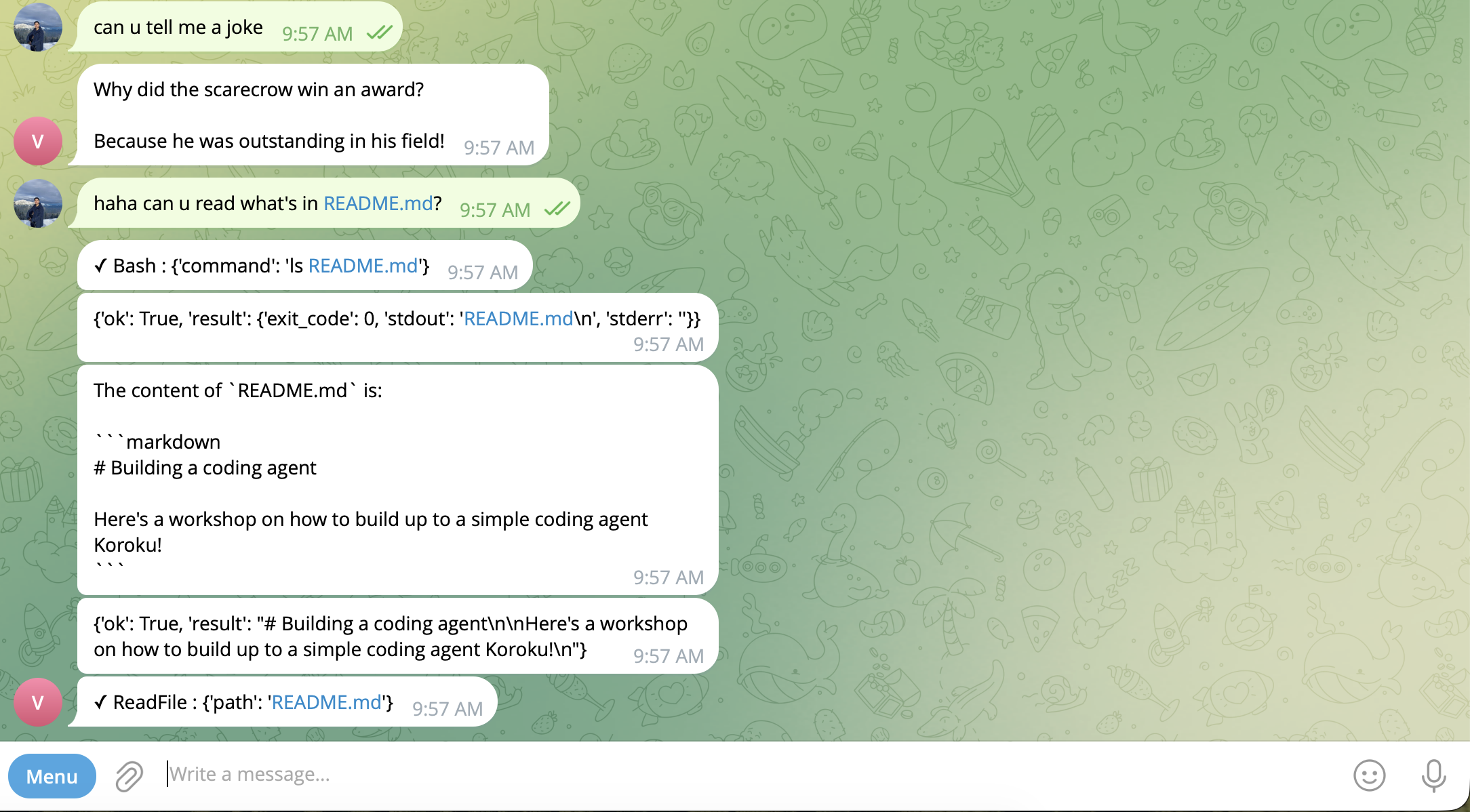
Start the server, send your bot a message, and now every tool call and response shows up on your phone as it happens — the same agent loop, just with different hooks registered.
Conclusion
We started with an agent trapped in a terminal and ended with one you can text from your phone. The key insight wasn't Telegram or ngrok — it was the refactor. By pulling hardcoded print() calls out of the agent loop and replacing them with hooks, we made the Agent class genuinely reusable. The CLI and Telegram server share the exact same run() method; they just register different callbacks.
But there's a glaring problem — conversations live in a Python list. Restart the server and everything's gone. Send enough messages and the context window fills up. In the next post, we'll tackle session management: persisting conversations to a database so they survive restarts, and compacting long conversations so the agent doesn't choke on its own history.