If you'd like to see the final result of this article, you can check out the code on GitHub.
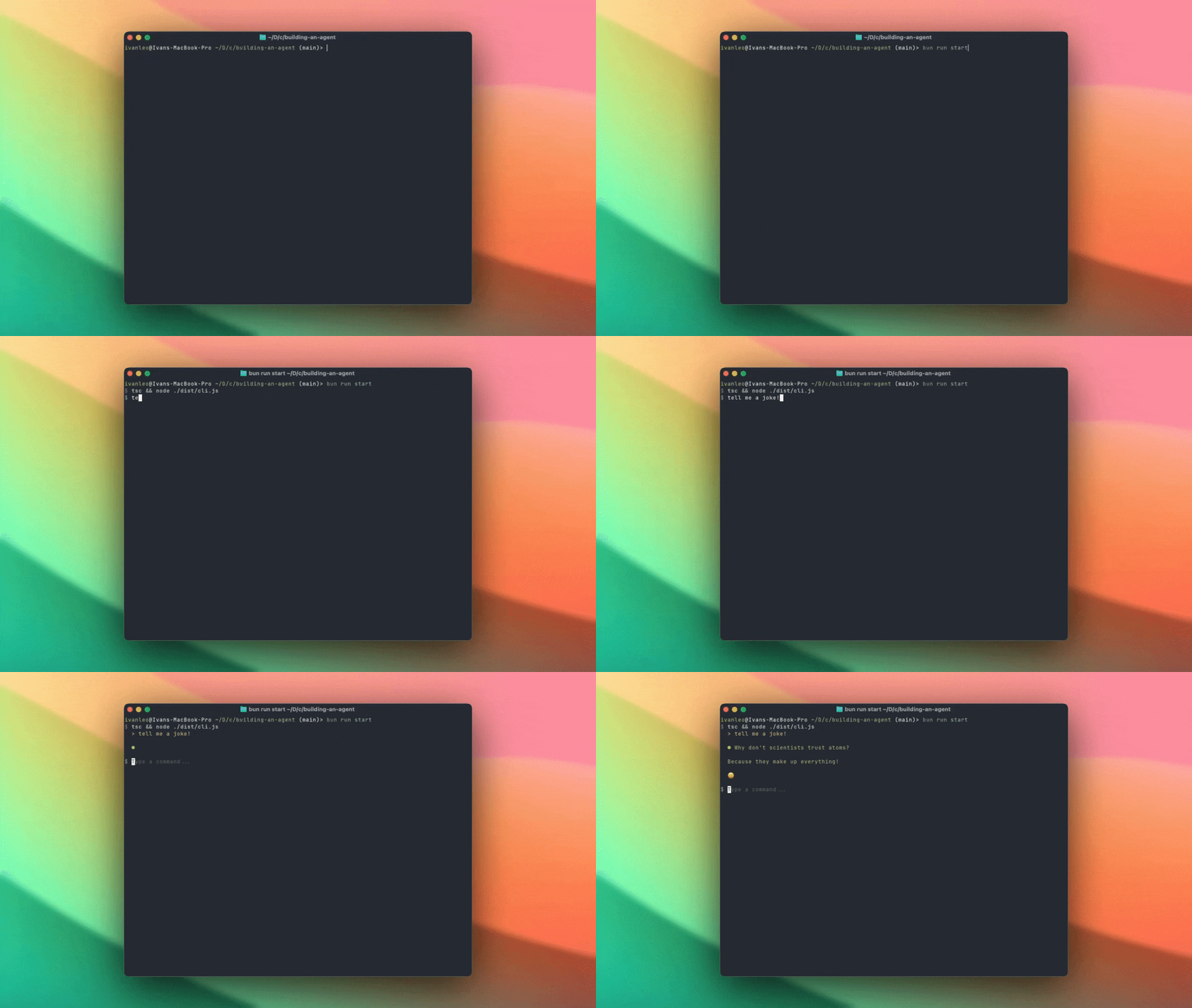
If you've ever used readlines, you'll know that it's a great way to get user input but it's not very flexible. In this article, we'll solve that problem by migrating to React Ink. Here's a glimpse at what the final result looks like
With this, we'll have a CLI that has a much richer set of features than readlines, better UI, and a more natural way to interact with the user. We'll also show how we can implement streaming in our UI for a much more interactive experience for the user.
We'll do so in three main steps
- First, we'll initialise a
react-inkproject and migrate our existing project and logic to use react-ink - Then, we'll use streaming without any tool calls so that we can show the user the output of the agent as it's being generated
- Finally, we'll migrate our tool calls to use streaming as well
Once we've done so, we'll have a CLI that's more responsive and interactive, with a better user experience.
Starting Our Migration
Let's now start and implement our new application using react-ink and suport streaming. We'll do so in 3 steps
- First, we'll initialise a new
react-inkproject - Then, we'll show how we can leverage streaming for a more responsive user experience in our application
- Lastly, we'll show how to use the same tools that we defined in the previous article to be able to interact with the application
Initialising React-Ink
Let's now migrate to our original project and initialise a react-ink project using the command below. This will initialise a new project in the current directory.
npx create-ink-app --typescript .
Let's now delete a few files that we won't need
rm .gitattributes .prettierignore test.tsx package-lock.json
Let's also install our dependencies again and add them to bun
bun add @anthropic-ai/sdk zod ink-text-input
Let's also add a new start command so we can run our cli easily when we make changes to our project
"scripts": {
  "build": "tsc",
  "dev": "tsc --watch",
  "test": "prettier --check . && xo && ava",
  // Add this here so that we build the latest version
  "start": "tsc && node ./dist/cli.js"
},
We'll then modify our react-ink render as seen below so that our terminal application will preserve the prior commands
#!/usr/bin/env node
import React from "react";
import { render } from "ink";
import App from "./app.js";

render(<App />, { patchConsole: false, exitOnCtrlC: false });
We can then update our application in app.tsx as seen below so that we can take in user input. We'll also add an event listener so that we can exit the appication when we're done interacting with the user
import React, { useState } from "react";
import { Text, Box, useInput, useApp } from "ink";
import TextInput from "ink-text-input";

export default function App() {
  const [input, setInput] = useState("");
  const [showShutdown, setShowShutdown] = useState(false);
  const { exit } = useApp();

  useInput((input, key) => {
    if (key.ctrl && input === "d") {
      setShowShutdown(true);
    }
  });

  return (
    <Box flexDirection="column" height="100%">
      <Box flexGrow={1} />
      <Box width="100%">
        <Text color="blue">$ </Text>
        <TextInput
          value={input}
          onChange={setInput}
          placeholder="Type a command..."
        />
      </Box>
      {showShutdown && (
        <Box>
          <Text color="yellow">Shutting down...</Text>
        </Box>
      )}
    </Box>
  );
}
Integrating with Anthropic
In order to handle the logic, we'll define a new hook called useMessage.ts. This will make it easy for us to abstract out the logic and the styling of the messages in our application.
Let's start by defining the scaffolding of the hook
import { useState } from "react";
import Anthropic from "@anthropic-ai/sdk";

export function useMessages() {
  const [messages, setMessages] = useState<Anthropic.MessageParam[]>([]);
  const [input, setInput] = useState("");

  const sendMessage = () => {
    setMessages((prev) => [...prev, { content: input, role: "user" }]);
    setInput("");
    // Add a stub for the assistant message
    setMessages((prev) => [
      ...prev,
      { content: "Assistant message", role: "assistant" },
    ]);
  };

  return {
    messages,
    input,
    setInput,
    sendMessage,
  };
}
We'll also define a new component called Message.tsx which will be responsible for rendering these messages and a loading state.
import React from "react";
import { Box, Text } from "ink";
import Anthropic from "@anthropic-ai/sdk";
import BlinkingDot from "./BlinkingDot.js";
interface MessageProps {
message: Anthropic.MessageParam;
}
export default function Message({ message }: MessageProps) {
if (message.role === "user") {
return (
<Box marginLeft={2}>
<Text color="yellow">> {message.content as string}</Text>
</Box>
);
}
if (message.role === "assistant" && message.content === "") {
return (
<Box marginLeft={2}>
<BlinkingDot color="green" />
</Box>
);
}
if (typeof message.content !== "string") {
return (
<Box marginLeft={2}>
<Text color="green">● {JSON.stringify(message.content, null, 2)}</Text>
</Box>
);
}
return (
<Box marginLeft={2}>
<Text color="green">● {message.content}</Text>
</Box>
);
}
Now that we've got our basic hook setup, let's add in the Claude Anthropic API to help respond to user queries. We'll be using streaming here so messages can be rendered in real time.
To do so, we'll update our sendMessage function so that it now renders content as it comes in with streaming.
const sendMessage = async () => {
  const userMessage = { content: input, role: "user" as const };
  setMessages((prev) => [...prev, userMessage]);
  setInput("");

  // Add empty assistant message that we'll update
  setMessages((prev) => [...prev, { content: "", role: "assistant" }]);

  const response = client.messages.stream({
    messages: [...messages, userMessage],
    model: "claude-4-sonnet-20250514",
    max_tokens: 4096,
  });

  for await (const chunk of response) {
    if (chunk.type == "content_block_delta") {
      if (chunk.delta.type == "text_delta") {
        const newContent = chunk.delta.text;

        setMessages((prev) => [
          ...prev.slice(0, -1),
          {
            role: "assistant",
            content: prev.slice(-1)[0]?.content + newContent,
          },
        ]);
      }
    }
  }
};
If you're unfamiliar with how streaming works, you can read more about it here.
But in short, instead of waiting for the entire response to be generated by Anthropic, we're getting a response chunk by chunk. This looks something like what you see below for a simple response. (We'll deal with tool calls later which will have a different delta type parameter.)
{
  "type": "content_block_delta",
  "index": 0,
  "delta": { "type": "text_delta", "text": "ello frien" }
}
This makes our application feel more responsive which is significant as our model responses get longer and tool calls get more complex. Let's now import our new Message component in our main app.tsx file.
import React, { useState } from "react";
import { Text, Box, useInput, useApp } from "ink";
import TextInput from "ink-text-input";
import { useMessages } from "./hooks/useMessages.js";
import Message from "./components/Message.js";

export default function App() {
  // Import in the hook
  const { messages, input, setInput, sendMessage } = useMessages();
  const [showShutdown, setShowShutdown] = useState(false);
  const { exit } = useApp();

  useInput((input, key) => {
    if (key.ctrl && input === "d") {
      setShowShutdown(true);
      exit();
    }
    if (key.return) {
      sendMessage();
    }
  });

  return (
    <Box flexDirection="column" height="100%">
      <Box flexGrow={1} flexDirection="column" gap={1}>
        // Map over the messages and render them as they get generated
        {messages.map((message, index) => (
          <Message key={index} message={message} />
        ))}
        {messages.length > 0 && <Box flexGrow={1} />}
      </Box>
      <Box width="100%">
        <Text color="blue">$ </Text>
        <TextInput
          value={input}
          onChange={setInput}
          placeholder="Type a command..."
        />
      </Box>
      {showShutdown && (
        <Box>
          <Text color="yellow">Shutting down...</Text>
        </Box>
      )}
    </Box>
  );
}
Now if you run bun run start, we can build our application and see it in action. You should get something like what we have below.
Refactoring for Tool calling
Now that we've got basic streaming and working in, we need to refactor our application to handle tool calls. We'll do so in 4 steps
- First, we'll refactor
sendMessageso that it can be called recursively when we have a tool call - Next, we'll then define our tools using the prior definitions in our previous article
- Then, we'll add in support for handling
content_block_start,content_block_deltaandcontent_block_endevents for both tool calling and text responses - Lastly, we'll bring everything together and see tool calling in action
Why Refactor our Application?
Unlike simple text responses that we can display character by character, tool calls require us to do two things:
- Build up JSON arguments incrementally - The tool arguments come in pieces like
{"pathenth":then"/home/user/fithenle.txt"} - Wait for complete arguments - We can't execute a tool until we have all the required parameters
The Anthropic streaming API sends us three key events to manage this complexity:
content_block_start: Tells us what type of content is starting (text or tool_use) so we can prepare the right data structurecontent_block_delta: Streams the actual content - either text characters or pieces of JSON for tool argumentscontent_block_end: Signals when a content block is complete, allowing us to execute any pending tool calls
Here's what tool call streaming looks like in practice. Let's examine a real response where Claude first responds with text, then makes a weather tool call:
event: content_block_start
data: {"type":"content_block_start","index":0,"content_block":{"type":"text","text":""}}

event: content_block_delta
data: {"type":"content_block_delta","index":0,"delta":{"type":"text_delta","text":"Okay"}}

event: content_block_delta
data: {"type":"content_block_delta","index":0,"delta":{"type":"text_delta","text":", let's check the weather:"}}

event: content_block_stop
data: {"type":"content_block_stop","index":0}

event: content_block_start
data: {"type":"content_block_start","index":1,"content_block":{"type":"tool_use","id":"toolu_01T1x1fJ34qAmk2tNTrN7Up6","name":"get_weather","input":{}}}

event: content_block_delta
data: {"type":"content_block_delta","index":1,"delta":{"type":"input_json_delta","partial_json":"{\"location\":"}}

event: content_block_delta
data: {"type":"content_block_delta","index":1,"delta":{"type":"input_json_delta","partial_json":" \"San Francisco, CA\""}}

event: content_block_delta
data: {"type":"content_block_delta","index":1,"delta":{"type":"input_json_delta","partial_json":", \"unit\": \"fahrenheit\"}"}}

event: content_block_stop
data: {"type":"content_block_stop","index":1}
Notice how this works:
- First content block (index 0) - Regular text that we can display immediately as it streams in
- Second content block (index 1) - A tool call where the
partial_jsonbuilds up:{"location":→{"location": "San Francisco, CA"→{"location": "San Francisco, CA", "unit": "fahrenheit"} - Only when
content_block_stopfires can we parse the complete JSON and execute the tool
This means our UI needs to handle both streaming text display AND accumulating tool arguments until they're complete.
Defining Our Tools
Now that we've refactored our code for tool calling, let's start by defining our first read_file tool in the lib folder.
touch source/lib/tools.ts
Let's start by copying over our tool definitions from our prior agent.ts file
import { z, toJSONSchema } from "zod";
import fs from "fs";

const readFile = async (args: { path: string }) => {
  const fileExists = fs.existsSync(args.path);

  if (!fileExists) {
    return `File does not exist at ${args.path}`;
  }

  const stats = fs.statSync(args.path);
  if (stats.isDirectory()) {
    const files = fs.readdirSync(args.path);
    return `This is a directory. Contents:\n${files.join("\n")}`;
  }
  return fs.readFileSync(args.path, "utf8");
};

const tool_defs = [
  {
    name: "read_file",
    description: "Read a file from the local file system",
    args: z.object({
      path: z.string(),
    }),
    execute: readFile,
  },
];

export const tools = tool_defs.map((item) => ({
  name: item.name,
  description: item.description,
  input_schema: {
    ...toJSONSchema(item.args),
    type: "object" as const,
  },
}));
We can then import these in our useMessages hook so that we can use them to execute the tools when we receive a tool call response from Claude.
Handling Content Blocks
Let's start by defining some simple helper functions to handle the creation of new messages when we receive either a text or tool call responses from Claude.
mkdir source/lib
touch source/lib/content_blocks.ts
We'll then define a function to handle the creation of new messages when we receive a content block from Claude.
This will create a new message with the appropriate role and content for us to start iteratively building the message content with for tool calls and messages.
import Anthropic from "@anthropic-ai/sdk";

export const create_content_block = (
  content_block: Anthropic.RawContentBlockStartEvent
): Anthropic.MessageParam => {
  if (content_block.content_block.type == "text") {
    return {
      role: "assistant",
      content: "",
    };
  }

  if (content_block.content_block.type == "tool_use") {
    return {
      role: "assistant",
      content: [
        {
          type: "tool_use",
          id: content_block.content_block.id,
          input: content_block.content_block.input,
          name: content_block.content_block.name,
        },
      ],
    };
  }

  throw new Error(
    `Unknown content block type: ${content_block.content_block.type}`
  );
};
Let's now handle the updates to messages as content_block_delta events stream in. We'll do so by creating a new helper function to handle these updates.
export const handle_content_delta = (
  chunk: Anthropic.RawContentBlockDeltaEvent,
  current_messages: Anthropic.MessageParam[]
): Anthropic.MessageParam[] => {
  if (chunk.delta.type == "text_delta") {
    const newContent = chunk.delta.text;
    return current_messages.map((message, index) => {
      if (index != current_messages.length - 1) {
        return message;
      }

      return {
        ...message,
        content: message.content + newContent,
      };
    });
  }

  if (chunk.delta.type == "input_json_delta") {
    const newContent = chunk.delta.partial_json;
    return current_messages.map((message, index) => {
      if (index != current_messages.length - 1) {
        return message;
      }

      const tool_use = message.content[0] as Anthropic.ToolUseBlockParam;

      return {
        ...message,
        content: [
          {
            ...tool_use,
            input: tool_use.input + newContent,
          },
        ],
      };
    });
  }

  throw new Error(`Unknown content block delta type: ${chunk.delta.type}`);
};
We'll then define a final method to handle the updates to messages when we get our final response from the API. We'll do so by first making sure the tool call exists in the list of tool definition and that we have a valid instance of the arguments for the tool call.
export const handle_content_end = async (
  current_messages: Anthropic.MessageParam[],
  tool_definitions: {
    name: string;
    description: string;
    args: z.ZodObject<any>;
    execute: (args: any) => Promise<string>;
  }[]
): Promise<Anthropic.MessageParam[]> => {
  const last_message = current_messages[current_messages.length - 1];
  // We want to check if the last message is a tool use
  if (!Array.isArray(last_message?.content)) {
    return current_messages;
  }

  const tool_use = last_message.content[0] as Anthropic.ToolUseBlockParam;

  const tool_definition = tool_definitions.find(
    (tool) => tool.name == tool_use.name
  );

  if (!tool_definition) {
    return [
      ...current_messages,
      {
        role: "user",
        content: `Error: Tool ${tool_use.name} not found`,
      },
    ];
  }

  // Validate that the tool use is valid
  const result = tool_definition?.args.safeParse(
    JSON.parse(tool_use.input as string)
  );
  if (!result?.success) {
    return [
      ...current_messages,
      {
        role: "user",
        content: `Error: Invalid tool use: ${result?.error?.message}`,
      },
    ];
  }

  const args = result.data;
  const tool_use_invocation = await tool_definition.execute(args);

  return [
    ...current_messages.slice(0, -1),
    {
      role: "assistant",
      content: [
        {
          ...tool_use,
          input: args,
        },
      ],
    },
    {
      role: "user",
      content: [
        {
          type: "tool_result",
          tool_use_id: tool_use.id,
          content: tool_use_invocation,
        },
      ],
    },
  ];
};
We can then update our useMessages hook so that we call these separate helper functions respectively.
const sendMessage = async () => {
  const userMessage = { content: input, role: "user" as const };
  let currentConvo = [...messages, userMessage];
  setMessages(currentConvo);
  setInput("");

  const response = client.messages.stream({
    messages: currentConvo,
    model: "claude-4-sonnet-20250514",
    max_tokens: 4096,
    tools,
  });

  for await (const chunk of response) {
    if (chunk.type == "content_block_start") {
      currentConvo = [...currentConvo, create_content_block(chunk)];
      setMessages(currentConvo);
    } else if (chunk.type == "content_block_delta") {
      currentConvo = handle_content_delta(chunk, currentConvo);
      setMessages(currentConvo);
    } else if (chunk.type == "content_block_stop") {
      currentConvo = await handle_content_end(currentConvo, tool_defs);
      setMessages(currentConvo);
    }
  }
};
With this, we now have a complete setup for handling streaming text and tool call responses from the Anthropic API. Try running your application now with bun run start and see the magic happen!
ivanleo@Ivans-MacBook-Pro ~/D/c/building-an-agent (main)> bun run start
$ tsc && node ./dist/cli.js
  > can you read index.ts

  ● I'll read the index.ts file for you.

  ● [
    {
      "type": "tool_use",
      "id": "toolu_013mGiNEWo1x1brFbVea7Y8W",                                                            "input": {
        "path": "index.ts"
      },
      "name": "read_file"
    }                                                                                                ]
                                                                                                     > [
    {
      "type": "tool_result",
      "tool_use_id": "toolu_013mGiNEWo1x1brFbVea7Y8W",
      "content": "console.log(\"Hello via Bun!\");"
    }
  ]
However, if we look at the current output, we can see that there's a final step in our application - we need to generate a response to the model's tool call result.
Updating sendMessage
We can generate a final response by modifying the sendMessage function to be able to call itself recursively.
This can be done in 2 simple ways
- We can define a simple helper to verify that the last step is a
tool_result - We can extract the inference step in
sendMessageinto its own helper function and allow it to call itself recursively.
Let's get cracking. First, we define a simple helper here in our content_blocks.ts file
export const is_tool_result = (messages: Anthropic.MessageParam[]): boolean => {
  const last_message = messages[messages.length - 1];
  if (!Array.isArray(last_message?.content)) {
    return false;
  }

  const tool_result = last_message.content[0] as Anthropic.ToolResultBlockParam;

  return tool_result.type == "tool_result";
};
This will help us determine if the last message is a tool result, and if so, we should call sendMessage recursively to generate a response to the tool result.
Next, let's extract out the inference step in sendMessage into its own method so it can call itself recursively.
const generateResponse = async (currentConvo: Anthropic.MessageParam[]) => {
  const response = client.messages.stream({
    messages: currentConvo,
    model: "claude-4-sonnet-20250514",
    max_tokens: 4096,
    tools,
  });

  for await (const chunk of response) {
    if (chunk.type == "content_block_start") {
      currentConvo = [...currentConvo, create_content_block(chunk)];
      setMessages(currentConvo);
    } else if (chunk.type == "content_block_delta") {
      currentConvo = handle_content_delta(chunk, currentConvo);
      setMessages(currentConvo);
    } else if (chunk.type == "content_block_stop") {
      currentConvo = await handle_content_end(currentConvo, tool_defs);
      setMessages(currentConvo);
    }
  }

  // Trigger a second request to get model response if the last message is a tool result ( This can be called recursively )
  if (is_tool_result(currentConvo)) {
    await generateResponse(currentConvo);
  }

  return currentConvo;
};

const sendMessage = async () => {
  if (input.trim().length == 0) {
    return;
  }
  const userMessage = { content: input, role: "user" as const };
  const currentConvo = [...messages, userMessage];
  setMessages(currentConvo);
  setInput("");
  await generateResponse(currentConvo);
};
This gives us the following output when we run bun run start in our terminal
ivanleo@Ivans-MacBook-Pro ~/D/c/building-an-agent (main)> bun run start
$ tsc && node ./dist/cli.js
  > can you read index.ts for me?

  ● I'll read the index.ts file for you.

  ● [
    {
      "type": "tool_use",
      "id": "toolu_01WkaHziDzefVrGNEepsP2TD",
      "input": {
        "path": "index.ts"
      },
      "name": "read_file"
    }
  ]

  > [
    {
      "type": "tool_result",
      "tool_use_id": "toolu_01WkaHziDzefVrGNEepsP2TD",
      "content": "console.log(\"Hello via Bun!\");"
    }
  ]

  ● The contents of the `index.ts` file are very simple: This is a basic TypeScript file that just prints "Hello via Bun!" to the console when executed.
Adding Other Tools
Our coding agent is almost complete! All that's lacking is just a few more changes are we're done here.
We'll be making a few changes to Message.tsx so that it displays the results more nicely. Specifically, we're going to be making it such that we only display tool calls that were made ( and not the result ) so that the UI is more pleasant.
We're also going to be adding 3 more tools to our coding agent - edit_file, list_files and write_file. These are the same tools that we provided in the previous article.
Updating Message.tsx
We'll update Message.tsx so that we no longer display the tool result for now.
import React from "react";
import { Box, Text } from "ink";
import Anthropic from "@anthropic-ai/sdk";

interface MessageProps {
  message: Anthropic.MessageParam;
}

export default function Message({ message }: MessageProps) {
  const textColor = message.role === "user" ? "green" : "yellow";
  const prefix = message.role === "user" ? ">" : "●";

  // This is a simple user message ( or text response )
  if (typeof message.content === "string") {
    return (
      <Box marginLeft={2}>
        <Text color={textColor}>
          {prefix} {message.content}
        </Text>
      </Box>
    );
  }

  // We want to return null for a tool result
  if (message.content[0]?.type == "tool_result") {
    return null;
  }

  // We want to display a nice tool call message
  if (message.content[0]?.type == "tool_use") {
    return (
      <Box
        marginLeft={2}
        width={50}
        borderStyle="round"
        borderColor="cyan"
        padding={1}
      >
        <Text color="cyan" wrap="wrap">
          Called {message.content[0].name}
        </Text>
      </Box>
    );
  }

  return (
    <Box marginLeft={2}>
      <Text color={textColor}>
        {prefix} {JSON.stringify(message.content, null, 2)}
      </Text>
    </Box>
  );
}
This will display the tool call message nicely as seen below
ivanleo@Ivans-MacBook-Pro ~/D/c/building-an-agent (main)> bun run start
$ tsc && node ./dist/cli.js
  > can you read index.ts?

  ● I'll read the index.ts file for you.

  ╭────────────────────────────────────────────────╮
  │                                                │
  │ Called read_file                               │
  │                                                │
  ╰────────────────────────────────────────────────╯

  ● The `index.ts` file contains a simple TypeScript/JavaScript program with just one line. This appears to be a basic "Hello World" program that outputs "Hello via Bun!" to the console, likely set up for use with the Bun JavaScript runtime.
Adding more Tools
Now we'll add our final tools to the project.
We covered the implementations in the previous article so I won't go into detail here.
const listFile = async (args: { path: string }) => {
  try {
    const { stdout } = await execAsync(
      `npx tree-cli ${args.path} -I "node_modules|.git|dist|build|.next|.vscode|coverage|node_modules"`
    );
    return stdout;
  } catch (error) {
    return `Directory not found: ${args.path}`;
  }
};

const editFile = async (args: {
  path: string;
  old_string: string;
  new_string: string;
}) => {
  const content = await readFile({ path: args.path });
  const updatedContent = content.replace(args.old_string, args.new_string);
  fs.writeFileSync(args.path, updatedContent);

  return `Updated ${args.path} with new content`;
};

const createFile = async (args: { path: string; content: string }) => {
  const dir = args.path.substring(0, args.path.lastIndexOf("/"));
  if (dir) {
    fs.mkdirSync(dir, { recursive: true });
  }
  fs.writeFileSync(args.path, args.content);
  return `File ${args.path} created successfully`;
};

export const tool_defs = [
  {
    name: "read_file",
    description: "Read a file from the local file system",
    args: z.object({
      path: z.string(),
    }),
    execute: readFile,
  },
  {
    name: "create_file",
    description: "Create a file in the local file system",
    args: z.object({
      path: z.string(),
      content: z.string(),
    }),
    execute: createFile,
  },
  {
    name: "edit_file",
    description: "Edit a file in the local file system",
    args: z.object({
      path: z.string(),
      old_string: z.string(),
      new_string: z.string(),
    }),
    execute: editFile,
  },
  {
    name: "list_files",
    description: "List files in a directory",
    args: z.object({
      path: z.string(),
    }),
    execute: listFile,
  },
];
Now with this, we've reimplemented the entire agent that we previously created in Building an Agent but with react-ink and streaming support.
This is a huge step! Now we've got an agent which can read, write edit files with full streaming capabilities. In the next article, we'll implement a provider agnostic CLI that can switch between different model providers and improve upon the current user interface that users have.